

Capitalism Lab Version 13.0
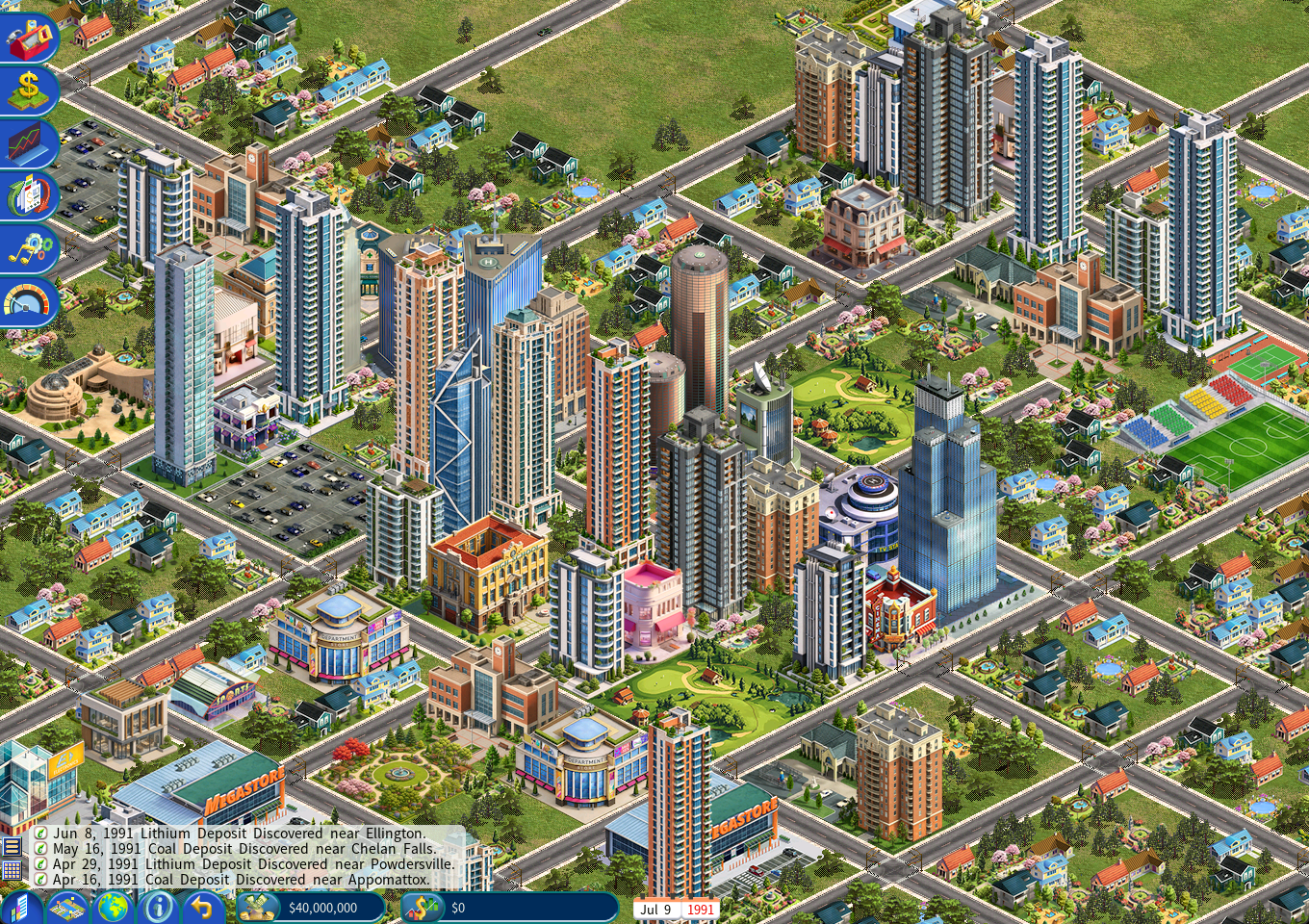
A fresh look for your cities
A less predictable technology race
Better tools for managing your empire
- Cash Flow Statement — Banking and Finance DLC: Track cash from operating, investing, and financing activities alongside your existing financial reports.
- Holdings page — Subsidiary DLC: View your corporate group as an ownership tree, including your effective stake at each level.
- Annual Score Rankings: Year-end rankings are now part of the base game, letting you follow the wealth race. Influence rankings require the City Economic Simulation.
- Configurable IPO requirements — Subsidiary DLC: Choose from five levels controlling how large or profitable companies must be before going public.
- AI expansion limits: Set limits on how many digital firms and product classes each AI company can take on.
Major New Features
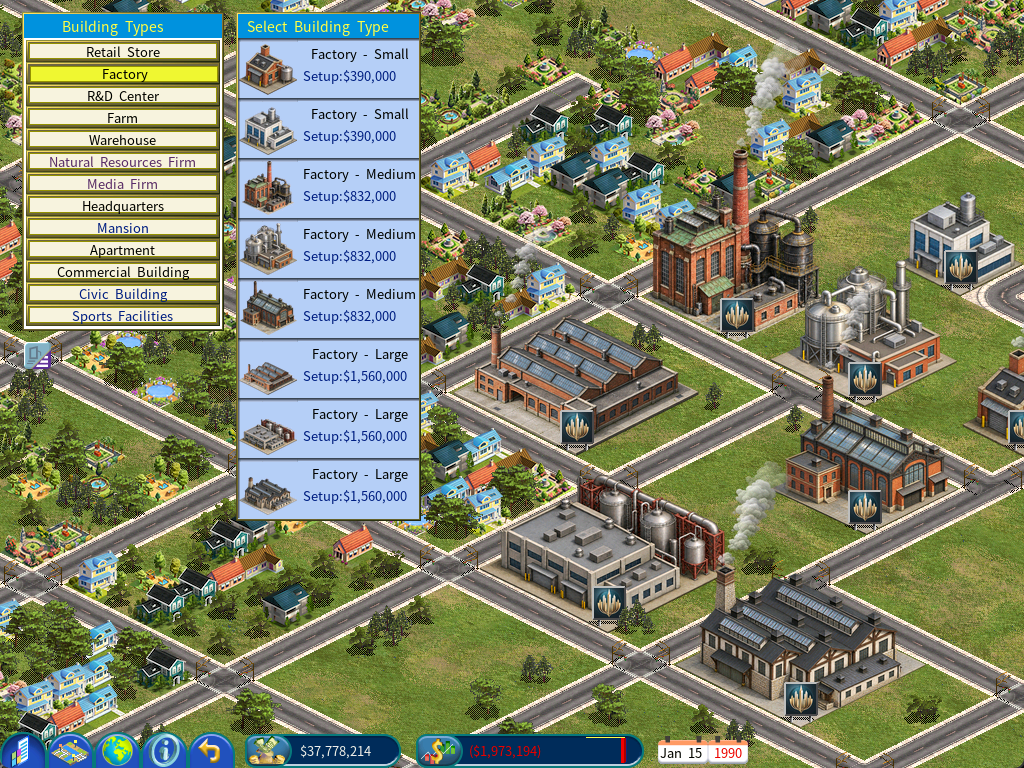
- 🏗️New Factory & Apartment GraphicsGraphics — Every factory has brand-new graphics, with eight designs in three sizes, and there are now 10 apartment buildings instead of 6.
- 🖼️Your Own Photo & LogoPersonalization — Use a photo of yourself as your character’s portrait and your own image as the corporate logo — carried inside the save file.
- 📊Cash Flow StatementReporting — A full, self-balancing statement of Operating, Investing and Financing cash, alongside the Balance Sheet and Income Statement.
- 🔬Radical Technology R&DResearch — A new R&D team type that gambles on a huge leap in a global technology, not just a product’s tech.
- 🔬Fast-Track an InventionResearch — Bet on inventing a new product years early — and risk it arriving years late.
- 🤖AI Radical ResearchAI — AI companies can now gamble on Radical R&D for outsized tech leaps, just like you.
- 🏢Holdings PageCorporate group — A new Corporations tab showing your subsidiaries as an indented ownership tree, with effective-interest at every level.
- 🏝️Improved Survival ModeSurvival Mode — Start in your own town while the AI grows a separate one — neither side can build in the other’s town until the isolation period ends.
- 🏆Annual Score RankingsRankings — The year-end wealth and influence rankings are now part of the base game.
Additional New Features and Improvements
- 🗺️Pre-defined MapsRegional Maps — Ready-made maps of real countries come with the game, and a map now loads with its cities in one step.
- 🎓The Your Expertise WindowNew game — Your expertise, its rating and its benefits in numbers, shown once at the start of every new game.
- ⚙️IPO Requirement LevelsNew-game option — Choose how hard it is for any company to go public — five levels, from Very Loose to Very Strict.
- ⚙️AI Expansion LimitsNew-game option — Cap how many digital firms and product classes each AI company may take on — keep the AI out of a sector you want for yourself.
- 💰Venture Capitalist OverhaulEconomy — VCs now put real capital at risk, take profit, and recycle their winnings into the next wave of startups.
- 📊By-Product-Class ViewsReporting — Group the Products and E-commerce screens by product class — plus new sorting for E-commerce.
- 📊More CSV ExportsReporting — Export the Products list exactly as displayed, and a bank’s or insurer’s income statement and balance sheet together in one click.
- ✨Show Active Company’s TechQuality of life — Point the product guides at any company you control, not just your main one.
- ✨Reset Layout PlansQuality of life — Clear a firm’s saved layout plans and copy the defaults back in one step — handy for tidying up a mod’s plans.
- 🔔Obsolete Product AlertAlerts — When a managed store drops a product because it has gone obsolete, the game now says so instead of leaving the shelf quietly empty.
- 🔬COO’s R&D Expertise Unlocks Radical R&DResearch — The COO managing an R&D Center can now unlock Radical R&D there with their R&D skill — not only your CEO or CTO.
- 🔬Radical R&D with the Digital Age DLCResearch — All three kinds of radical research now come with the Digital Age DLC too, so you no longer need the Subsidiary DLC for them.
AI Companies Can Now Do Radical Research
Requires the Subsidiary DLC or the Digital Age DLC. Radical R&D is available when the Subsidiary DLC or the Digital Age DLC is enabled and a company’s R&D leadership is skilled enough to attempt it. The AI’s use of Radical Technology R&D needs the Digital Age DLC, since that is where global technologies come from.
Radical R&D lets a company gamble on an outsized technology leap — targeting a large multiple of the normal tech gain (up to several times over) against a success roll, rather than the slow, steady climb of ordinary research. Until now this was a player-only tool. In 13.0, AI companies use Radical R&D too, running it alongside their traditional research.
The upshot: AI competitors can now make the same kind of sudden technology jumps you can, so leaving a rival behind on tech is no longer a safe bet. The AI weighs the gamble itself and mixes radical projects in with normal ones, making the technology race across the whole economy more dynamic and less predictable.
The AI plays the new options too
Everything added to radical research in 13.0 is available to your competitors as well, so the two features above are not a player-only advantage:
| AI behavior | What it means for you | Needs |
|---|---|---|
| AI builds Radical Technology R&D teams | An AI R&D Center that would have staffed a Technology R&D team may instead gamble on a big leap in a global technology — which can lift a rival’s whole product range at once, or unlock a product they couldn’t build before. | Digital Age DLC |
| AI fast-tracks inventions | When an AI radical team has nothing to catch up on, it may bet on inventing a new product early instead of sitting on steady research — so a competitor’s product can appear on the market years sooner than its normal development time suggests. | Subsidiary or Digital Age DLC |
| AI chooses smarter targets | The AI now aims its gambles at the technologies it is furthest behind on, reaches for a bigger multiple the bigger the deficit, and sets a research period long enough to actually close the gap — so a trailing rival is more likely to claw its way back into the technology race. | Subsidiary or Digital Age DLC |
The AI stays at the safer end. It never picks the top two fast-track risk levels — an AI company can’t judge a decade-long setback the way you can, so it sticks to the safer end of the scale. The recklessly aggressive plays remain yours alone.
IPO Requirement Levels
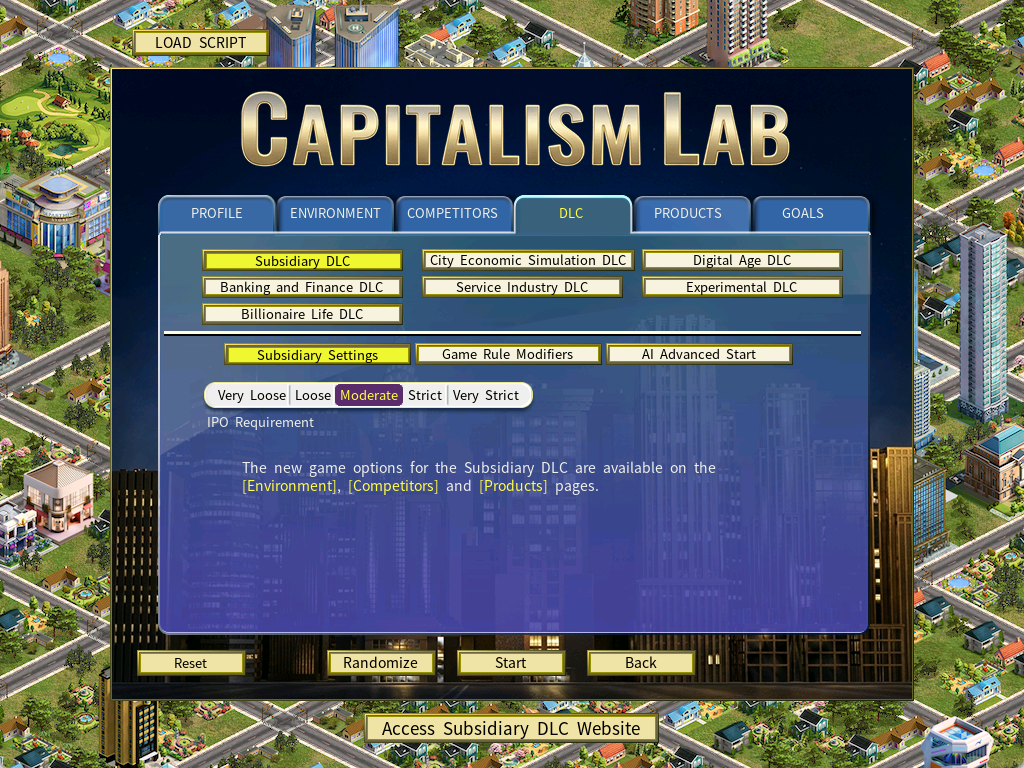
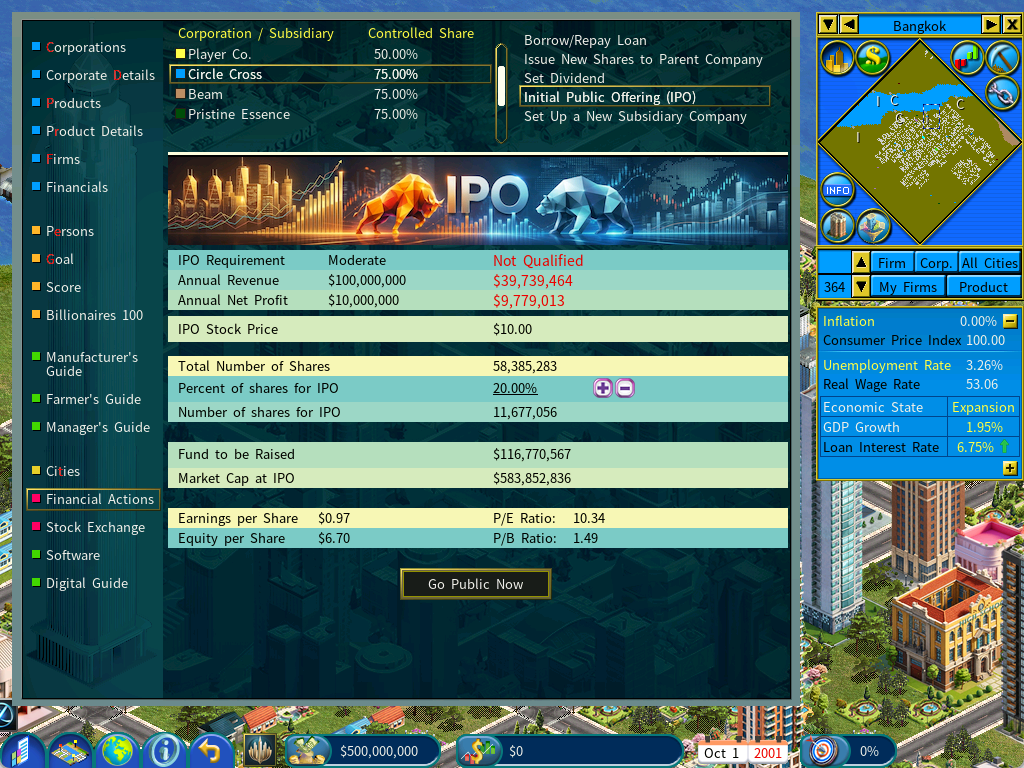
Going public used to be available to almost any company. Version 13.0 adds a new-game setting — IPO Requirement — that controls how large and profitable a company must be before it can hold an IPO. It applies equally to you and to the AI companies, so a stricter setting means a market where only genuinely substantial businesses reach the exchange.
The five levels
A company qualifies by meeting either the annual-revenue bar or the annual-net-profit bar, judged on its most recent completed fiscal year:
| Level | Annual revenue ≥ | or net profit ≥ |
|---|---|---|
| Very Loose | $10M | $1M |
| Loose | $50M | $5M |
| Moderate (default) | $100M | $10M |
| Strict | $300M | $30M |
| Very Strict | $500M | $50M |
How it plays
- Set it up front: choose the level when starting a new game (on the Subsidiary Settings page). The default is Moderate.
- Clear feedback: the IPO screen shows a requirement panel with the level name, the two thresholds, and your company’s actual figures — green when a bar is met, red when it isn’t, plus an overall Qualified / Not Qualified verdict.
- First year excepted: a company can’t IPO in the very first game year, since it has no completed fiscal year to judge.
- On top of the usual gates: the existing minimum market-cap and positive-equity requirements still apply — the new test is an additional bar, not a replacement.
Venture Capitalist Overhaul
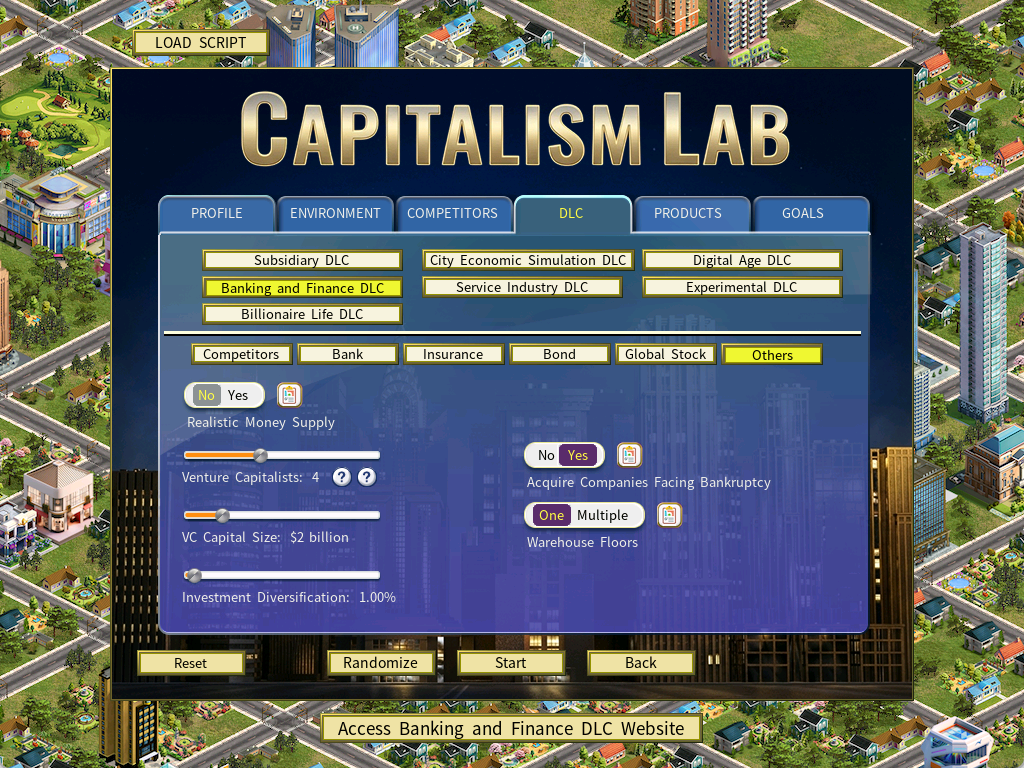
Banking & Finance DLC. These changes apply when you play with Venture Capitalists enabled.
If you play with VCs turned on, they now behave far more like the real thing. Previously a VC was a one-and-done seed investor: it bought in at a company’s founding and then sat on those shares for the rest of the game — quietly locking a chunk of every AI company’s stock off the market and letting its money sit idle. Now VCs are an active, self-recycling part of the economy.
What’s changing
| Change | What it means for you |
|---|---|
| VCs take profit and exit | Once a company a VC seeded goes public and its share price has grown to a healthy multiple of what the VC paid, the VC gradually sells down its stake. Those shares return to the market — so you can finally buy them — and the VC’s freed-up cash goes back to funding the next wave of startups. |
| VC capital is finite again | VCs now actually pay for the shares they take when a company is founded, and their war chest rises and falls with their wins and exits. That makes the VC Capital Size game setting a real balance lever — it genuinely controls how much founding capital the AI economy can tap. |
| Correct gains and losses | A VC’s holdings now track a proper purchase cost, so their investment gains and losses read correctly. |
How it feels in-game
- A VC starts taking profit once a holding is worth roughly 3× its founding cost, and unwinds the position gradually — a slice each month — rather than dumping everything at once.
- Exits are staggered across the different VCs, so they don’t all rush for the door in the same month.
- VCs still hold private companies patiently — there’s simply no market to sell into until a company goes public or is bought out.
- A buyout pays VCs in full, whether someone buys up the company’s shares or acquires a private company outright — so an acquisition is a clean exit for them too.
Why it matters. The change frees up a large pool of AI-company stock that used to be permanently off the table, and turns VC funding into a living resource that ebbs and flows with the market — more startups when VCs are flush, fewer when they’ve overextended.
By-Product-Class Views & E-commerce Sorting
Two screens that list products can now organize that list by product class, making a long roster far easier to scan when you deal in many different goods.
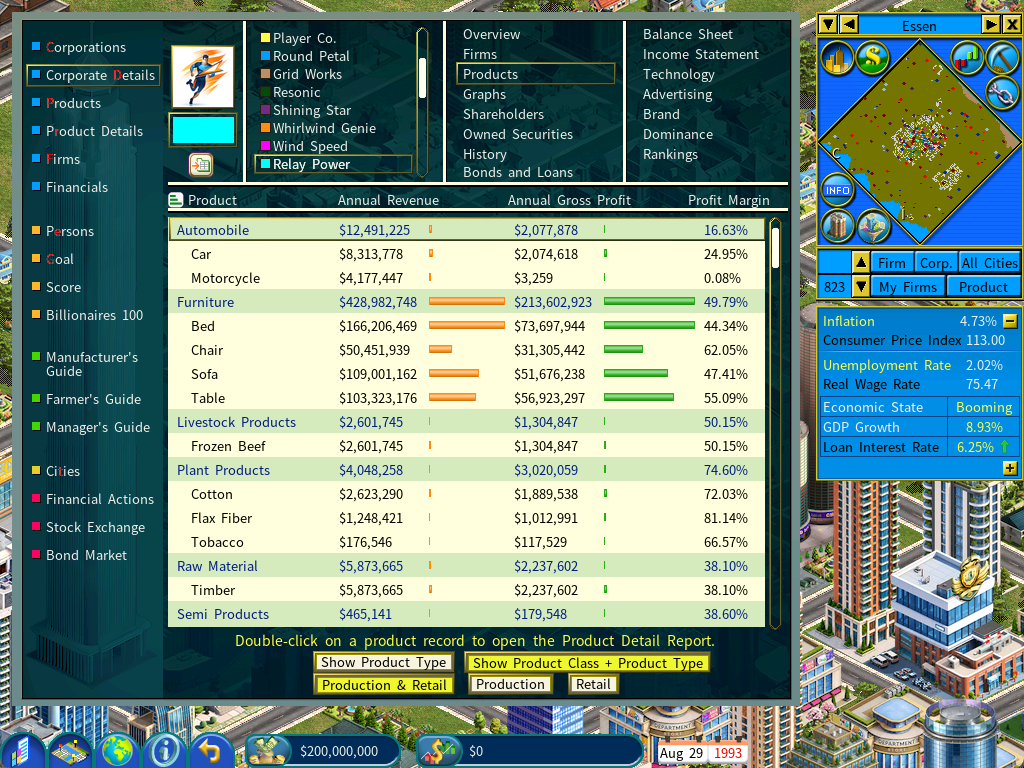
Corporate Detail → Products
The Products screen gains a new view mode that lists by product class. Instead of one flat list, products are grouped under their product class heading, with the individual product types shown beneath each class — so you can take in your whole product line-up class by class at a glance.
E-commerce
The E-commerce screen gets the same treatment: a new by-product-class view mode that groups product types under their class. On top of that, the E-commerce screen now supports sorting, so you can order the list to bring the entries you care about to the top.
More CSV Exports — Products, Banks & Insurers
Requires the Banking & Finance DLC. CSV export is part of the Banking & Finance DLC, so the Export to File icons described here appear only when it is enabled.
Version 13.0 extends spreadsheet export. The Products list export now follows the new by-class view, and a bank or insurance company can hand you its income statement and balance sheet together. Both write plain CSV files that Excel and other spreadsheet programs open directly, into the game’s Export folder under My Games\Capitalism Lab.
Corporate Detail → Products
The Export to File icon on the Products page writes the list exactly as you are looking at it, with no dialog in between. It now follows both of the page’s selectors:
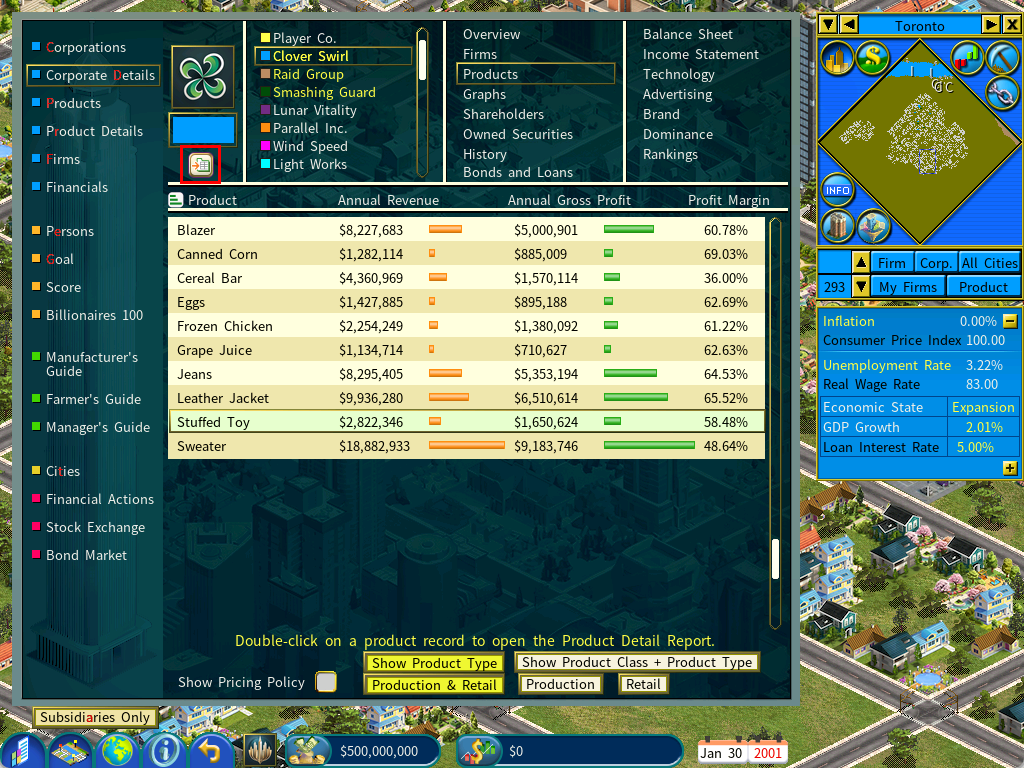
- The Production & Retail / Production / Retail buttons decide which firms’ figures are counted.
- The Show Product Type / Show Product Class + Product Type toggle (see By-Product-Class Views) decides whether you get a flat list or a grouped one.
Rows come out in the same order and sort direction as the screen, so sorting by Annual Gross Profit before you export gives you a file already ranked that way. Grouped exports gain a leading Product Class column: each class heading carries its own totals, and every product row repeats its class name, so the file stays easy to sort, filter and pivot once it is in a spreadsheet.
The file name records which view produced it — for example Beam Products (Production) 1990-06-19.CSV, with by Class added for the grouped view. Export the same day from different views and you get separate files rather than one overwriting the other.
Bank & Insurance Headquarters → Financial
The Financial page of a Bank Headquarters or an Insurance Headquarters gains a pair of icons at the left of the column header row:
| Icon | What it does |
|---|---|
| Export to File | Writes both the income statement and the balance sheet as two CSV files in a single click, and names both in one confirmation message. You do not have to switch tabs to get the pair — either tab exports both. |
| Data Export Options | Opens the same options window the Corporations list uses, for setting up recurring exports. |
Exporting them automatically
The two financial statements can also be exported on a schedule. Open Data Export Options and set:
| Setting | Choices | Default |
|---|---|---|
| Export Bank & Insurance Statements Scope | Player Company · Player Company and Subsidiaries · All Companies | Player Company |
| Export Bank & Insurance Statements Frequency | Disabled · Every Year · Every Quarter · Every Month | Disabled |
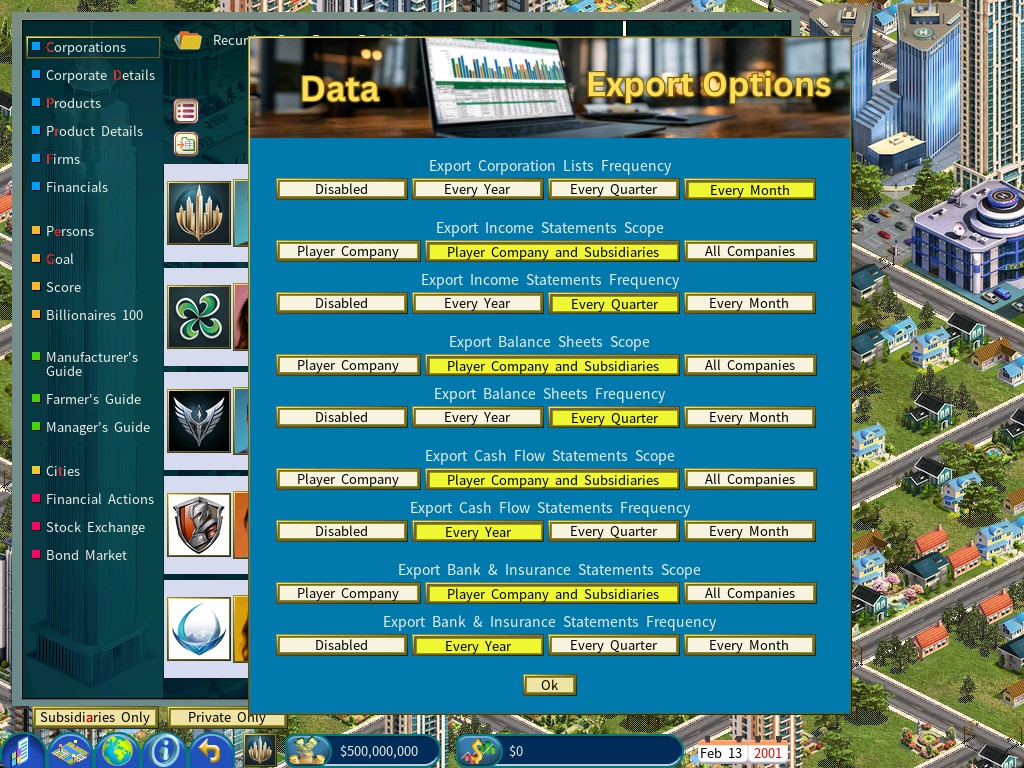
One setting drives both statements, for both kinds of company: switch it on and each company in scope contributes its bank’s pair, its insurer’s pair, or both. A company that owns neither is simply skipped. Files land in a sub-folder named after the game, at the start of each period, with no message box interrupting play.
The row names only what your game actually has. With banks and insurers both enabled it reads Bank & Insurance Statements; with only one of them, Bank Statements or Insurance Statements; with neither, the row does not appear at all.
Trade secrets are respected. When Show Competitor Trade Secrets is off — as it is by default from difficulty level 4 upward — you cannot open a rival’s Financial page, so no export icon appears there. The All Companies choice is likewise removed from the scheduled export, so the CSV files can never show you figures the game itself will not.
Exporting to a file that is already open in Excel will not fail: the game writes to … (2).CSV instead, so a scheduled export keeps running even if you left last month’s file open.
Reset the Layout Plan Library to Default
The Layout Plan Library — the window where you save, load and manage a firm’s interior layout plans — now has a Reset to Default button in its header, to the right of the product filter. It clears out the saved plans and copies a fresh set from the game’s standard plans, so you can undo a messy library in a single step instead of deleting plans one at a time.
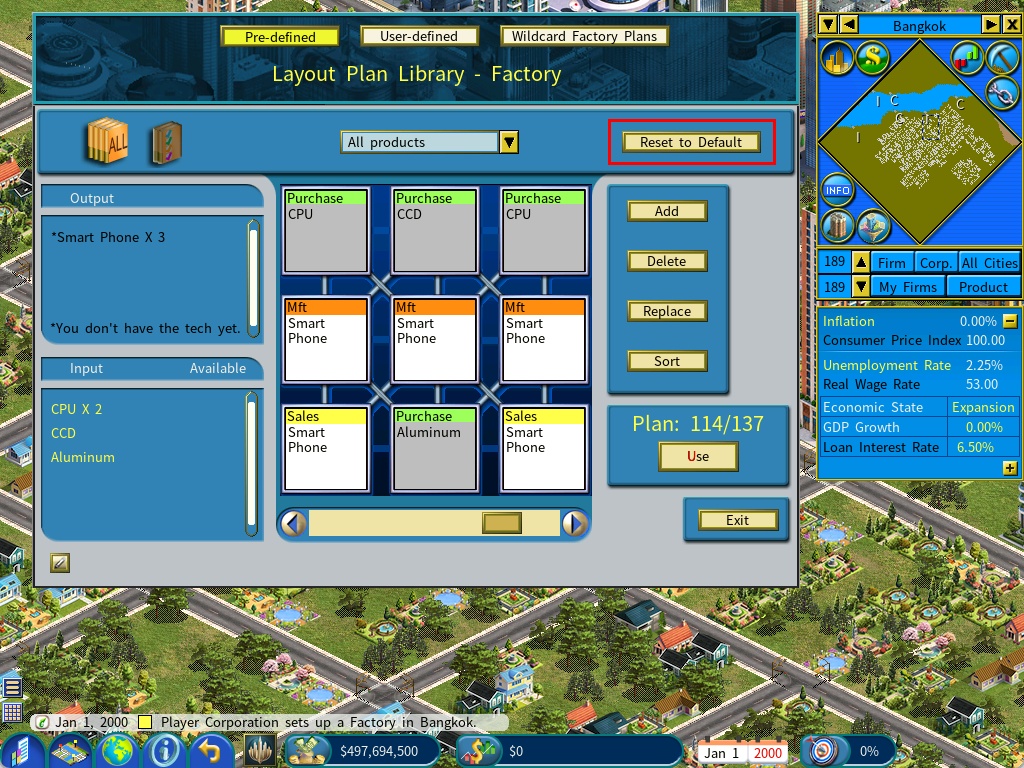
This is especially handy when working on a mod: a mod’s layout plans can drift into a broken or cluttered state during testing, and one reset restores them to a clean baseline.
What it does
Clicking Reset to Default asks how much to reset:
| Choice | Effect |
|---|---|
| Current firm type | Clears and rebuilds the layout plans for just the firm type you’re viewing (for example, only Factories). |
| All firm types | Does the same for every firm type at once. |
| Cancel | Leaves everything as it is. |
Either choice clears both the pre-defined and user-defined plans in scope and copies the default set back in. Auto-generated wildcard plans are left untouched, and the change is saved automatically.
Playing a mod that ships its own plans? If the active mod includes its own layout plan file, the reset first asks which defaults to copy from — the mod’s own plans or the game’s standard plans. When only one set of defaults exists, it uses that and skips the question.
Alert When a Store Drops an Obsolete Product
Open one of your stores, find an empty shelf where a product used to be, and wonder what happened — this release answers that question. When a store run by a manager stops selling a product because the product has gone obsolete, you now get an alert message saying exactly that:
Your Retail Store has stopped selling Motorcycle because the product has become obsolete.
The behavior behind it is not new. When a newer product supersedes an older one, demand drains away from the old product year after year; once almost all of it has moved across, a managed store gives up on the old product — it drops the supply link and its sales unit clears the shelf. That is the right call, since nobody wants a store full of goods that no longer sell. What was missing was any word of it: the store simply went quiet, and working out why meant digging through the product guides.
Where it appears
It arrives as an ordinary alert message. The alert indicator on the info bar lights up; press F5 or click the indicator to open Alert Messages. Go jumps straight to the store, and Ignore / Ignore All dismisses it like any other alert.
When it fires
| Condition | Detail |
|---|---|
| Which firms | Retail outlets belonging to your company. |
| Which stores | Only ones with a manager in charge. A store you run yourself never drops a product on its own, so there is nothing to report — this is about what your COO or store manager decides while you are looking elsewhere. |
| At what point | When the product’s demand shift reaches 90% — the same mark that puts the Obsolete label on it in the Manufacturer’s Guide. |
| How often | Once per store, at the moment it happens. It does not keep nagging afterwards. |
Seeing it coming. Open a product in the Manufacturer’s Guide and its page names the newer product phasing it out, alongside a Demand Shifted percentage climbing toward 100%. That figure turns red past the halfway mark — an early warning that a product line is on its way out, long before a manager pulls the plug on it.
COO’s R&D Expertise Unlocks Radical R&D
Radical R&D, Radical Technology R&D and fast-tracked inventions need someone with an R&D skill of at least 20. Until now that had to be your company’s CEO or CTO. In version 13.0 the COO who manages the R&D Center counts too. A COO with strong R&D expertise can now unlock radical research in the R&D Centers they run, even when your CEO and CTO could not.
The highest R&D skill of the three — CEO, CTO or the managing COO — also sets how high a target multiple (or invention risk level) you can choose: 20 for 200%, 40 for 300%, 60 for 400%, 70 for 500% and 100 for 600%.
Tip. The COO’s skill only counts in the R&D Centers the COO manages. AI companies follow the same rule.
Radical R&D with the Digital Age DLC
Radical R&D used to come only with the Subsidiary DLC. It now also comes with the Digital Age DLC, so either DLC is enough. This covers all three kinds of radical research: Radical R&D, Radical Technology R&D and fast-tracked inventions. Radical Technology R&D still needs the Digital Age DLC, since that is where global technologies come from. You still need a CEO, CTO or managing COO with an R&D skill of at least 20, and AI companies follow the same rule.
At a glance: where to find each feature
| Feature | Where | Needs |
|---|---|---|
| Cash Flow Statement (guide) | Financials → Cash Flow Statement tab, or Corporate Details → Balance Sheet → toggle | Banking & Finance DLC |
| Your Expertise window (guide) | Automatic, on the first day of a new game | Base game (software expertise needs the Digital Age DLC) |
| Radical Technology R&D (guide) | R&D Center → add a team → Radical Technology R&D (4th team type) | Digital Age DLC, CEO/CTO/managing COO R&D skill ≥ 20 |
| Fast-track an invention (guide) | Radical R&D unit → R&D New Product → pick a risk level | Subsidiary or Digital Age DLC, CEO/CTO/managing COO R&D skill ≥ 20 |
| AI Radical Research | Automatic — AI companies run it alongside normal R&D, including radical technology projects and fast-tracked inventions | Subsidiary or Digital Age DLC (technology projects: Digital Age DLC) |
| Holdings page (guide) | Corporations report → Holdings tab (after Firm Overview) | Subsidiary DLC |
| IPO Requirement | New game → Subsidiary Settings (default: Moderate) | Base game |
| AI Expansion Limits (guide) | New game → DLC → Digital Age DLC → Game Rule Modifiers tab (digital firms); Subsidiary DLC → Game Rule Modifiers (product classes) | Digital Age DLC (digital firms), Subsidiary DLC (product classes); scripts: any |
| Venture Capitalist overhaul | Automatic when VCs are enabled; tune with VC Capital Size | Banking & Finance DLC |
| Improved Survival Mode (guide) | New game → Survival Mode page → Town Isolation at the Beginning + Isolation Period (Years) | City Economic Simulation DLC, Survival Mode on |
| Pre-defined regional maps & one-click loading (guide) | New game → Regional Map page → Load Regional Map | City Economic Simulation DLC |
| Products by product class | Corporate Detail → Products — new view mode | Base game |
| E-commerce by class + sorting | The E-commerce screen — new view mode & sorting | Base game |
| Export the Products list | Corporate Detail → Products → Export to File icon | Banking & Finance DLC |
| Export bank / insurer statements | Bank or Insurance HQ → Financial → the two icons before the column header; schedule them in Data Export Options | Banking & Finance DLC |
| Show active company’s Tech (guide) | Checkbox on the Manufacturer’s, Software & Internet Guides | Subsidiary DLC + control ≥1 company |
| Your own photo & logo (guide) | New game → PROFILE tab → click the YOUR PORTRAIT or CORPORATE LOGO box → Import Photo… / Import Logo… | Base game (PNG files) |
| Reset layout plans to default | Layout Plan Library → Reset to Default button (header) | Base game |
| Obsolete product alert | Automatic — read it in Alert Messages (F5 or the info-bar alert indicator) | Base game, store run by a manager |
| COO’s R&D expertise unlocks Radical R&D | Automatic — put a COO with R&D skill ≥ 20 in charge of an R&D Center | Subsidiary or Digital Age DLC |
| Radical R&D with the Digital Age DLC | R&D Center → add a team → Radical R&D / Radical Technology R&D | Subsidiary or Digital Age DLC |
| Annual Score Rankings (guide) | Automatic at the end of each year; turn off in Options (O) → Show Annual Score Rankings | Base game (influence rankings: City Economic Simulation or Billionaire Life DLC) |
| New factory & apartment graphics (guide) | The build menu, when you build a factory or an apartment building | Base game |