

Billionaire Life DLC
Corporate Brand Override
Run Range Brand or Unique Brand, but put selected products under your Corporate Brand — so they share your corporate brand awareness, including the boost from Corporate Philanthropy and your PR department.
Corporate Brand Override breaks the old all-or-nothing branding choice. A company on Range Brand or Unique Brand can now tick individual product classes (Range) or product types (Unique) to be branded under the Corporate Brand instead — a hybrid branding strategy, decided product by product.
The feature is also controlled by a New Game setting — DLC → Billionaire Life DLC → Philanthropy → “Corporate Brand Override” (Yes by default). Set it to No if you prefer the classic behavior where one brand strategy applies to your entire product line.
Why it exists
Under the Billionaire Life DLC, your Corporate Philanthropy score raises your Corporate Brand awareness — and so does your PR department. But those bonuses flow only into the corporate brand. A company on Range or Unique Brand builds a separate brand per product class or per product, none of which sees a cent of that goodwill.
The override lets you route the products you choose through the corporate brand, so your philanthropy and PR investment finally pays off on them — without forcing your whole catalog under a single umbrella name.
The three brand strategies (recap)
| Strategy | How brands are kept | Override available? |
|---|---|---|
| Corporate Brand | One umbrella brand covering every product you sell. | Not needed — everything is already corporate. |
| Range Brand | One brand per product class (e.g. all your beverages share a brand). | Yes — tick individual classes. |
| Unique Brand | A separate brand for every product type. | Yes — tick individual products. |
Where to find it
- Open the Corporate Details report for your own company (a company you control).
- Go to the Brand tab.
- Make sure your brand strategy is Range Brand or Unique Brand.
A new “Corp.” column appears on the far right of the brand list, with a small checkbox on every row. Click a checkbox to tag or untag that class/product; the row’s Awareness, Loyalty and Brand Rating figures immediately switch to show the corporate values.
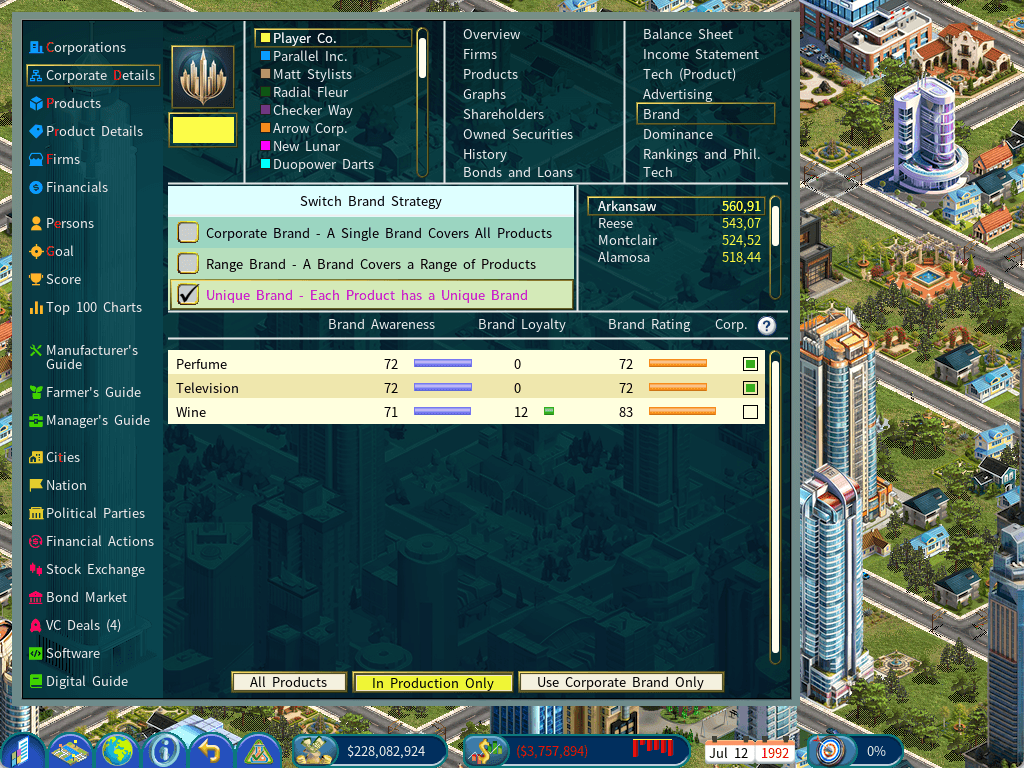
The column only appears for companies you control, on Range/Unique Brand, with the DLC and the setting enabled. Viewing a competitor’s Corporate Details report never shows it.
Choosing which rows to show
At the bottom of the Brand tab, a three-way filter decides which rows the list shows:
| Mode | What it lists | Use it when |
|---|---|---|
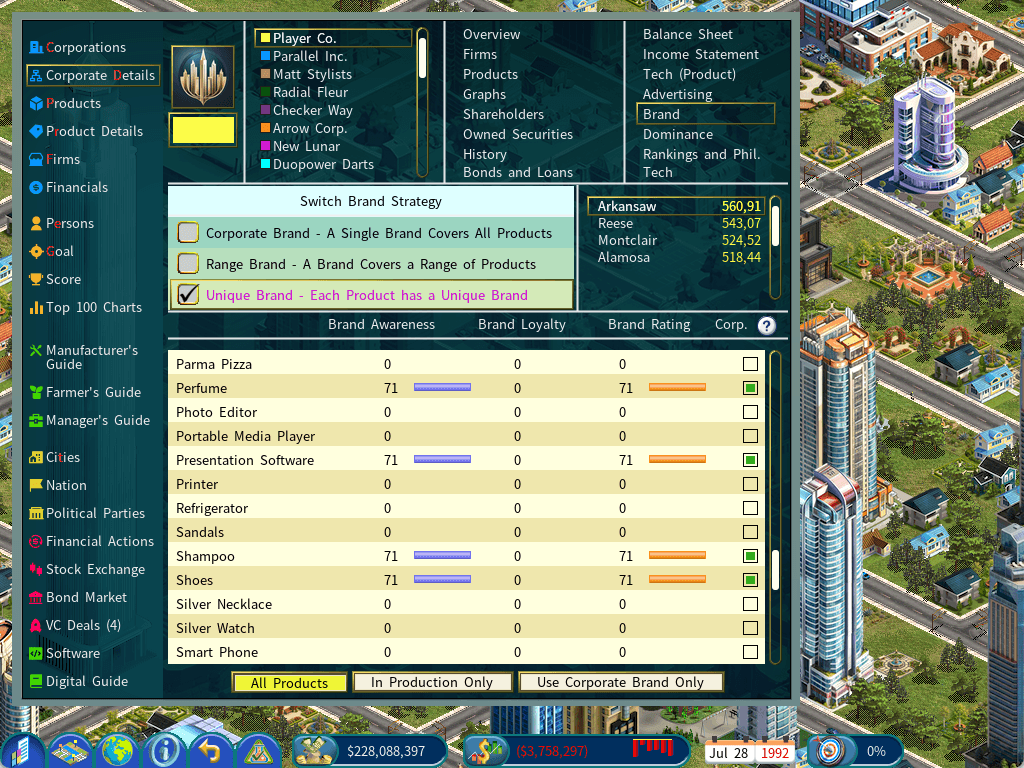
| All Products | Every consumer product class/type enabled in this game — whether or not you make it or have ever advertised it. | Pre-tagging a product before you launch or advertise it. |
| In Production Only (default) | Only the classes/products your company is currently producing. | Managing the brands of what you actually sell — the usual starting point. |
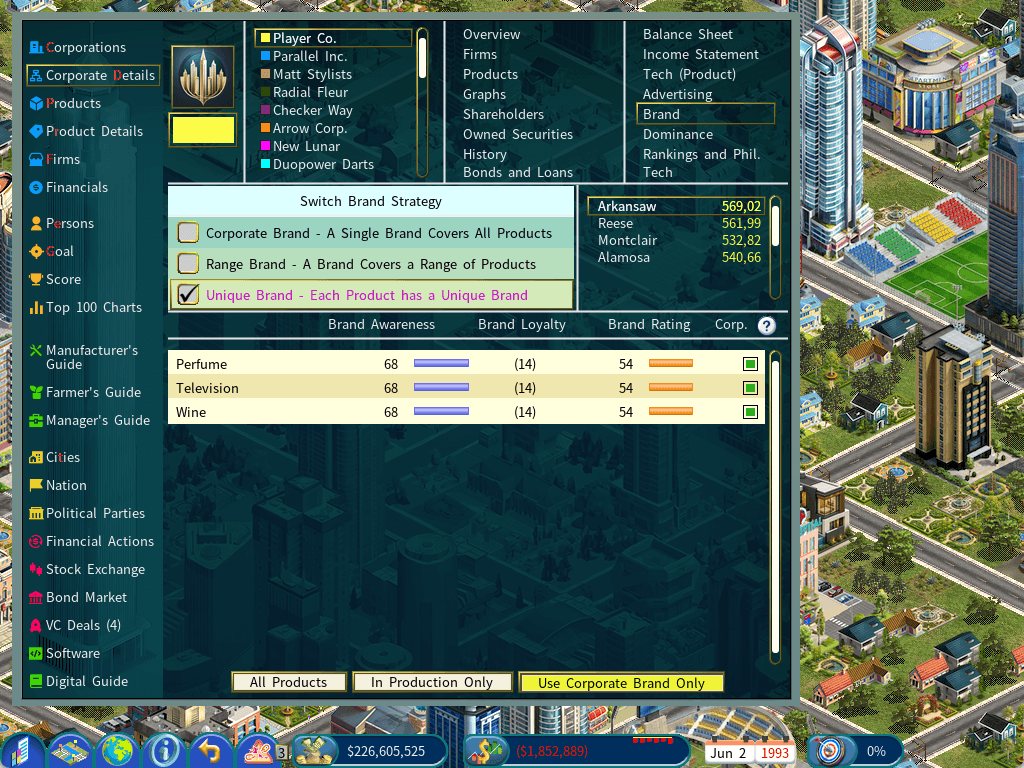
| Use Corporate Brand Only | Only the classes/products you have already tagged to use the Corporate Brand. | Reviewing everything sharing your corporate brand at a glance, and untagging. |
Rows for products you don’t make simply show zero bars. That is expected — the point of All Products is to expose their checkbox so the decision is made before you spend on advertising.
What changes when a product is tagged
A tagged class/product behaves exactly as if your company were on Corporate Brand for that line:
| Aspect | Untagged (Range / Unique) | Tagged (Corporate Brand) |
|---|---|---|
| Brand awareness source | Its own per-class / per-product brand. | Your corporate brand awareness. |
| Corporate Philanthropy bonus | None. | Applies — the headline benefit. |
| PR department boost | None. | Applies. |
| Advertising | Builds that product’s own brand. | Builds the corporate brand — lifting every tagged product at once. |
| Brand loyalty | Its own loyalty pool. | The shared corporate loyalty pool, including the umbrella dilution penalty. |
| Sales & demand | Both use the resulting brand rating in the usual way — tagged products simply get a different (corporate) rating. | |
The trade-off
Pooling is a double-edged sword, and that is intentional:
- Upside — one advertising campaign lifts all your tagged products, and philanthropy plus PR pour into the same pool.
- Downside — they share loyalty. A quality problem on one tagged product drags down the corporate brand and therefore every other tagged product. Tagged products also pay the same umbrella dilution penalty that a full Corporate Brand company pays for spreading one name across many product lines.
Housekeeping rules
- Changing a tag resets that product’s own brand — and warns you first. Ticking or un-ticking a checkbox resets the product’s own brand awareness and loyalty to zero in every city. If there is anything to lose, a confirmation box appears (“…this cannot be undone”) with a “Don’t show this message again” option that is remembered for the rest of the current game (a new game asks again).
- Untagging starts that product from scratch. It resumes its own brand, which is now empty, and must be rebuilt through advertising. The shared corporate pool is not reduced while other products are still tagged — so don’t flip tags casually.
- Untag the last product and the pool is wiped. When no products remain tagged, the shared corporate pool is cleared, so a later re-tag starts from a clean corporate brand instead of inheriting the numbers left by products you had tagged before.
- Changing brand strategy clears every tag. Switching between Corporate / Range / Unique Brand resets all overrides — Range tags classes and Unique tags individual products, so they can’t carry across.
- No limit. Tag one product or all of them. Tagging everything is simply Corporate Brand behavior for those lines.
- AI companies don’t use it. Each AI picks a single brand strategy and never sets overrides, so this is a strategic option available to you alone.
Tips
Capitalism Lab — Billionaire Life DLC · Corporate Brand Override player guide · see also the Philanthropy Page and Billionaire Life DLC guides