

Modding Analysis Tool
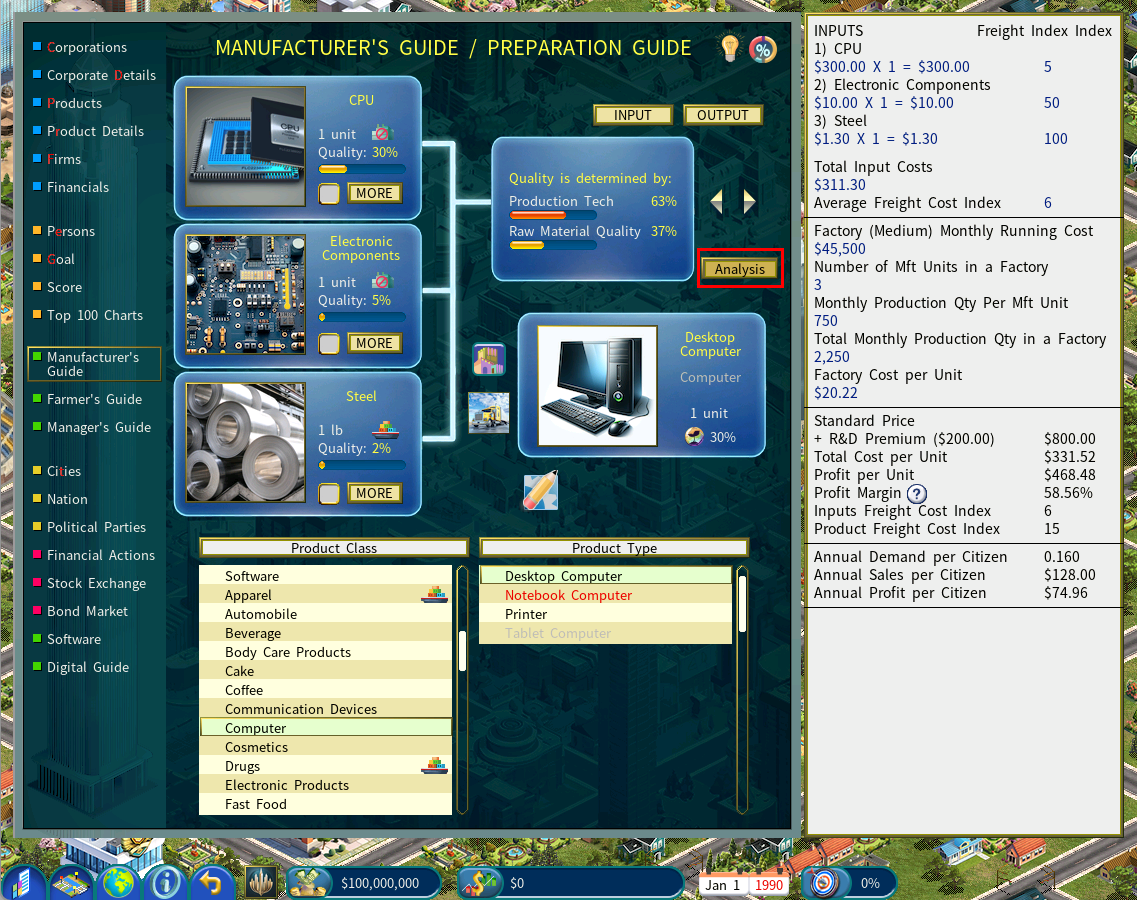
Press ALT + M to activate the Mod Analysis Tool. Once enabled, an “Analysis” button will appear in the Manufacturer’s Guide. Click it to open the tool.
The Analysis Tool evaluates a product’s profit margin by factoring in multiple variables, providing a detailed breakdown of the elements that influence profitability, as shown below.
Enabling Additional Modding Tools
To activate the extended modding features, extract “MOD.SYS” from the MOD_SYS.ZIP file below and place it in your Capitalism Lab program folder.
Download MOD_SYS.ZIP
Once the game detects the MOD.SYS file, the following features will become available:
Government Menu Access (ALT‑G)
Press ALT + G on the city map to temporarily unlock the government’s Build Firm, Land‑use Planning, and Build Road menus, even if you are not the city’s mayor.
Press ALT + G again to disable this access.
Product Image Verification (ALT + ‘=’)
Press ALT + ‘=’ to run a validation scan on all product images in the current mod. The game will report any missing or invalid images.
Manufacturer’s Guide – Analysis Tool Enabled by Default
The Analysis Tool in the Manufacturer’s Guide will be automatically enabled. You will no longer need to press ALT + M to activate it.