
New Running Modes in Capitalism Lab
1) Background Running
The game can now be set to continue running in the background while you use other applications on Windows.
Option: Game continues to run in the background
This option allows the game to keep running even when it is not in focus or minimized.
Option: Skip display frames when in the background
When the game is running in the background, it periodically draws a single frame while skipping several frames in between. This reduces the video processing workload and improves the game’s performance. A slider is provided to adjust the number of frames to skip.
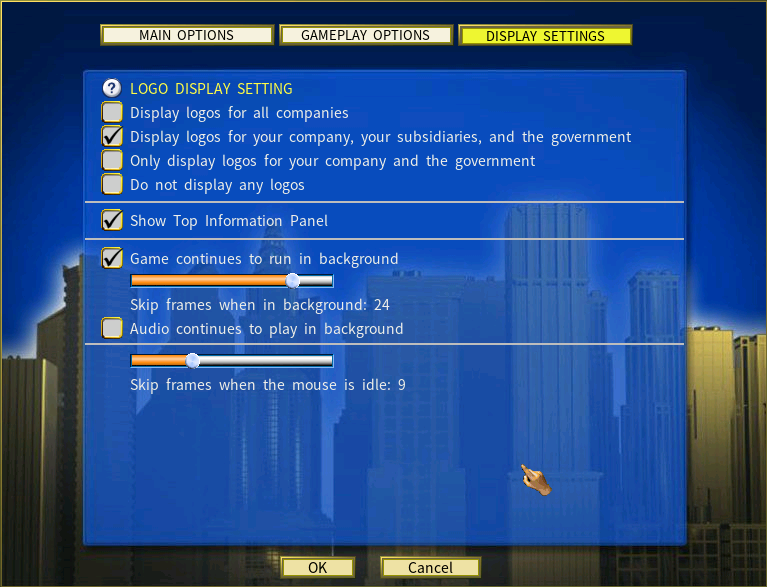
2) Skip Frames When the Mouse is Idle
When the game speed is set to maximum and the mouse is idle, the system will periodically render one frame while skipping several frames in between. This reduces the video processing workload and improves the game’s performance. The slider allows you to adjust the number of frames to skip.
Capitalism Lab Performance Tests with this New Feature
Simulation setup: Start a new game and run it at the maximum speed setting (Mode 5) for 2 in‑game years with 50 companies and 7 cities.
The results below show the amount of real time needed to complete the 2‑year run under each setting:
| View / Setting | Time to Run 2 Years |
|---|---|
| Fixed on the City map view | 1 minute 28 seconds |
| Viewing the City map, Information Center and Firm Details | 50 seconds |
| Fixed on the Farmer’s Guide | 32 seconds |
| Fixed on the City map view with “Skip frames when mouse is idle” = 10 frames | 12 seconds |
| Fixed on the City map view with “Skip frames when mouse is idle” = 20 frames | 10 seconds |
| Fixed on the City map view with “Skip frames when mouse is idle” = 30 frames | 8 seconds |