

Script – Cities
A [CITIES] section adds cities to your game — either ones from the Capitalism Lab database, or cities of your own invention.
Choosing a city
City=<city name>
To add more than one city, start another block with its own City= line. Everything below applies to the city whose block it is in.
Placing a city that is not in the database
Globe X=<1 to 470>
Globe Y=<1 to 260>
A custom city needs its X and Y coordinates on the global map window — which you can open in game with the W key.
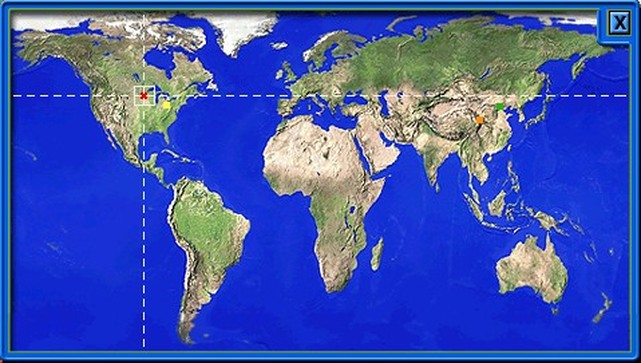
One way to find them: save the world map image above (right-click, Save Image), open it in an image editor and read off the pixel position. It is 479 × 271 pixels.
That is tedious. The web tool below does the same job far faster.
City properties
Population=<see below>
| Setup | Valid range | Why |
|---|---|---|
| With the City Economic Simulation DLC | 50,000 – 500,000 | A lower population scale, in exchange for a far more detailed simulation of the citizens. See Ultra-realistic City Economic Simulation. |
| Without it | 500,000 – 5,000,000 | A more straightforward citizen simulation, which allows a higher scale. |
Real Wage Rate=<30 to 100>
Consumer Goods Seaports=<0 to 4>
Industrial Goods Seaports=<0 to 4>
Reusing another city’s terrain
Map Seed=<map seed 1>, <map seed 2>
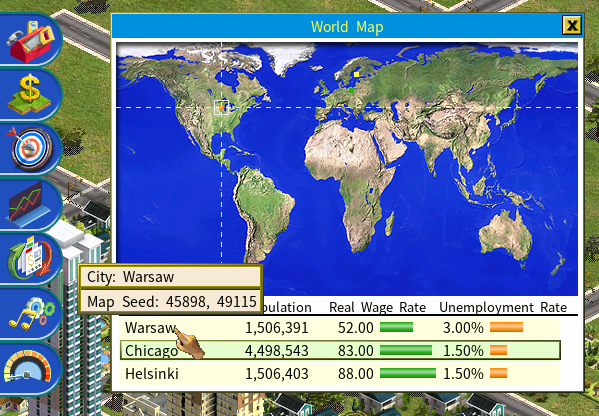
Every city has a unique pair of map seeds behind its terrain. Hover over a city’s name on the world map to read them.
Enter that pair for your new city and the game recreates the same terrain — an identical map to the one you took the seed from.
All of the parameters above are optional. Leave one out and the game randomizes it.
Locking a city
Locked=Yes
A locked city allows no business to be built in it until it is unlocked — which happens when the player achieves a goal whose reward unlocks it.
Script – Goal Rewards and PenaltiesPlacing a city on a custom regional map
City Economic Simulation DLC only.
Regional Map X=<grid position>
Regional Map Y=<grid position>
The horizontal and vertical grid position on the loaded regional map.
These two lines only do something on an imported custom map, with the DLC enabled. On a generated map they are ignored — silently, so a script that seems to place cities badly may simply be using the wrong pair. On a generated map, use Globe X and Globe Y instead.