

Bank Headquarters

Setting one up
Open the Build menu, select [Bank and Finance DLC], choose the Bank Headquarters building, and place it on the city map.
The capital splits in two. Half pays for the headquarters itself; the other half is injected into the new bank as its operating capital.
Overview
Two things are set here, and both apply bank-wide.

| Control | What it does |
|---|---|
| Bank deposit interest rate | The [+][-] buttons set the 1-year time deposit rate. Every other term — 6 months, 2, 3 and 5 years, and saving accounts — adjusts automatically to match. |
| Staff training budget | Shows the average across all branches. Move the slider and the change applies to every branch at once. |
The same page reports the figures that decide how the bank is doing:
| Figure | What it means |
|---|---|
| Staff skill level | The average across all branches, and a direct input to service quality. With the City Economic Simulation DLC enabled, the city’s education level affects it too. |
| Customer waiting time | The average across all branches. When it grows alarming, the answer is more branches. |
| Quality of service | The average across all branches, determined by staff skill level and customer waiting time. Once waiting time passes 30, it starts pulling service quality down. |
| Bank brand rating | Held per city. Raise it city by city, through the [Marketing] page of each bank branch. |
Deposits
Two views, reached from the same page.
Deposits from all branches
What customers placed through branch offices. Saving accounts pay the lowest interest; time deposits pay more, in exchange for the money staying put for a set term of six months to five years.

Longer terms generally pay more than shorter ones, and every rate is derived automatically from the 1-year rate you set on the Overview page.
Deposits from HQ
Deposits made through the headquarters itself — by corporations and by in-game persons.

Loans
From the bank’s point of view, loans are assets — they earn interest — and deposits are liabilities, because interest must be paid on them. The gap between the two is the bank’s net interest income.
It looks as though you simply raise net interest income by lending at higher rates. But higher-interest loans carry higher default risk, and in a downturn high-interest loans made to poor-credit borrowers are exactly the ones that fail.
Allocating new loans by credit rating
On the [All Loans] page, the New Loans Allocation column sets the percentage going to borrowers of each credit rating, using the [+] and [-] buttons.

The starting position lends evenly across every credit rating — 20% each. A conservative banker cuts exposure to the risky end; a bolder one raises it and collects the higher interest.
Strategy tip. High-interest loans are a double-edged sword, and a bank’s profitability depends heavily on the state of the economy. In a boom, even a bank that has lent aggressively to high-risk borrowers can enjoy high interest income with few defaults. A recession reverses that completely: the same aggressive lending that made the bank so profitable produces significant write-offs.
Loans to corporations
Select [Loans to Corporations] to see individual loans.

The loan-to-deposit ratio
At the bottom of the screen:
| Figure | What it is |
|---|---|
| Current loan-to-deposit ratio | Total loans divided by total deposits. |
| Maximum loan-to-deposit ratio | Set with the [+][-] buttons. Once the current ratio exceeds it, the bank stops making new loans. |
The right ratio is a genuine balancing act. Lend out too much of your deposits and you risk a liquidity crisis — not having the funds to meet withdrawal requests. Lend too little and the idle deposits earn nothing while you still pay interest on them.
The ideal range is typically 80% to 90%. The absolute ceiling is set separately, on the [Bank] page of the New Game Settings menu.
Loan defaults
Defaults are inevitable; the exposure is what you control. [All Defaults] shows the default rate for each credit rating — and poor-credit borrowers default at many times the rate of good-credit ones. [Defaults by Corporations] shows the individual cases.

The bottom of the screen shows what those defaults cost the bank’s bottom line.
That is the whole job of running a bank: set a deposit rate that attracts deposits, then allocate loans with balanced risk and return — maximizing net loan interest income while minimizing defaults.
Competition
The competing banks, their deposit interest rates and their market shares — which tells you whether raising your own rate is worth it.

Financial statements
The [Financial] page carries the bank’s income statement and its balance sheet.

The income statement combines the headquarters and every branch.
The balance sheet matters enough in banking to have an article of its own:
Understanding Bank Capital RequirementsTransferring funds with the parent corporation
On the [Financial] page, select [Fund Transfer].

Click the arrow icon in the center to switch direction — bank to corporation, or corporation to bank.
Taking cash out of the bank is limited by two constraints:
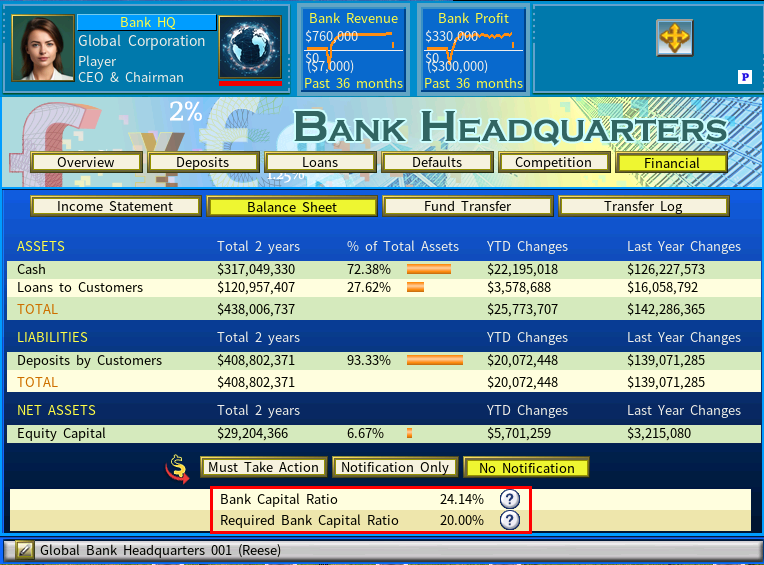
1. The bank capital ratio must hold
It must not fall below the Required Bank Capital Ratio on the balance sheet.
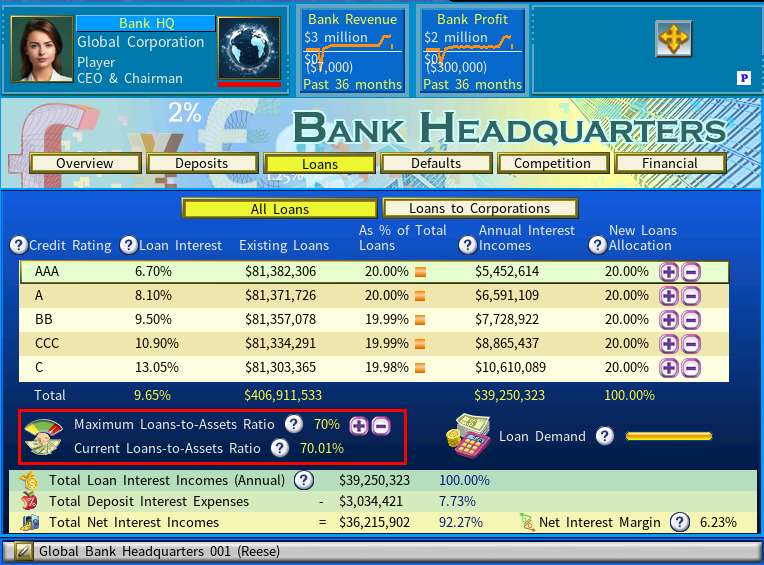
2. The loans-to-assets ratio must hold
It must not exceed the Maximum Loans-to-Assets Ratio shown in the Loans section.
Select [Transfer Log] to see the bank’s transfer history.
Strategy guides
- Mastering Bank Management: A Comprehensive Guide, by Stylesjl
- Bank Setup and Management Video Guide, by YouTuber Lightproton